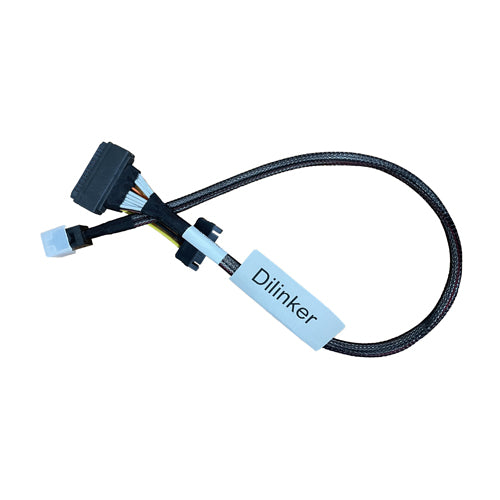
DiLinKer MiniSAS HD (SFF-8643) to U.2 NVMe Cable, SFF-8639 68-Pin, 75cm, with SATA Power
DiLinKer MiniSAS HD (SFF-8643) to U.2 NVMe Cable, SFF-8639 68-Pin, 75cm, with SATA Power
The long version of our SFF-8643 to U.2 cable: same four PCIe lanes, same 68-pin drive connector, same SATA power tail, but 75 cm of run so the drive can live in a front cage while the port sits at the back of the board. It is the length most 4U and tower builds actually need, and the one people end up buying twice when they start with a 50 cm cable and find it does not reach.
Why the extra 25 cm matters
- Routing distance, not straight-line distance. A drive in the front cage of a 4U chassis is often 60–70 cm of cable path from a rear PCIe slot once you go around the fan wall. 50 cm cables get pulled taut in that layout, and a taut cable loads the 68-pin connector — the usual cause of a drive that drops out under vibration but works on the bench.
- PCIe lanes only — the SAS trap. The 8643 shell is shared with SAS hardware, but this assembly carries PCIe. It works from a motherboard, riser or PCIe switch port that exposes NVMe on 8643; it does not work from an LSI RAID card or HBA, whose 8643 ports drive SAS lanes. We have tested that combination and the drive never enumerates.
- Powered from the PSU, not from the slot. U.2 SSDs need 3.3 V, 5 V and 12 V, and this cable brings all three in on a standard 15-pin SATA tail. Leave the tail off only when the drive is fed by a backplane.
- Nothing to configure, nothing to flash. No switch, no re-driver, no firmware. Four lanes in, four lanes out, straight 1:1, which also means the drive behaves identically whether it is the only one in the box or one of twenty-four.
Specifications
| Connector A | MiniSAS HD 4i, SFF-8643, 36-pin (host side) |
| Connector B | U.2 / SFF-8639, 68-pin (drive side) |
| Power | SATA 15-pin tail — 3.3 V / 5 V / 12 V |
| Lanes | 4 (PCIe x4, straight 1:1 mapping) |
| Length | 75 cm end to end |
| Signal | PCIe 3.0 x4 native; PCIe 4.0 where host and routing allow |
| Protocol | NVMe over PCIe — no SAS, no SATA |
| SKU | B087TMZ99N |
Compatibility
Works with
- 4U rackmount and tower chassis where the drive cage is far from the slot
- SFF-8643 ports on boards, risers and PCIe switch cards that carry PCIe lanes
- 2.5″ U.2 NVMe SSDs (SFF-8639) of any vendor
- Builds where the 50 cm cable was just too tight
Does not work with
- LSI / Broadcom RAID cards and HBAs — SAS lanes in a 8643 shell, tested incompatible with U.2 drives
- SAS and SATA drives — the 68-pin end is PCIe-wired
- U.2 backplanes, which need two 8643 plugs rather than an 8639 plug
- Cable chains: do not daisy-chain two of these to make 150 cm — passive PCIe does not tolerate that
Typical deployments
- 4U storage build, front cage to rear slot. The drive sits in a hot-swap bay at the front, the 8643 port is on a rear add-in card, and 75 cm is what it takes to route above the fan wall with slack.
- Tower workstation with a full-length GPU. Graphics cards in the top slot push cable routing sideways; the extra length keeps the run off the card and away from the CPU cooler.
- U.2 drive on a bench test rig with the board at arm’s length. Enough length to move the drive between machines without unplugging anything.
Frequently asked questions
What is the difference between this and the 50 cm version?
Length only. Same connectors, same wiring, same SATA power tail, same 18-odd grams of cable. Choose by the routing distance in your chassis, not by the drive: if you are not sure, measure the path and add 10 cm of slack.
Does it work with an LSI RAID card?
No, and this is worth repeating because the connector fits either way. LSI RAID cards and HBAs put SAS lanes on their SFF-8643 ports; a U.2 SSD needs PCIe lanes. The drive will not appear. If you have a 94xx Tri-Mode controller, use our LSI94xx twin-U.2 cable, which is built for exactly that port.
Can I run PCIe 4.0 U.2 drives on it?
Yes if the host port is Gen4. 75 cm is still within reach for Gen4 signalling, though a long passive run always has less margin than a short one — if the link trains at Gen3 on your board, that is the board and the length talking, not a fault. The drive works either way.
Which end goes where?
The 36-pin MiniSAS HD plug goes into the port on the board or card; the 68-pin U.2 plug goes into the drive. Both are keyed, so you cannot seat them backwards, but do check you are plugging into an 8643 port and not a neighbouring 8644 external port.
Do I need the SATA power tail?
For a bare 2.5″ U.2 SSD, yes — it is the only power path. Connect it to any free SATA power lead. If the drive sits in a powered backplane, the tail stays unplugged.
Will longer cable slow the drive down?
No. A passive cable either carries the link at the negotiated speed or fails to train; it does not quietly halve your throughput. Length affects signal margin at Gen4, which shows up as a generation step-down if anything, not as degraded performance.
In the box
- 1 × SFF-8643 to U.2 (SFF-8639) NVMe cable, 75 cm, with SATA power tail (SKU B087TMZ99N)
Every cable is continuity- and pinout-tested before it ships and carries a 24-month warranty. If a link does not train, send us the controller model and the backplane part number before returning anything — in most cases the cable is the wrong variant for the port, not faulty, and we would rather tell you that up front.
Related
Product features
Product features
Materials and care
Materials and care
Merchandising tips
Merchandising tips
Share