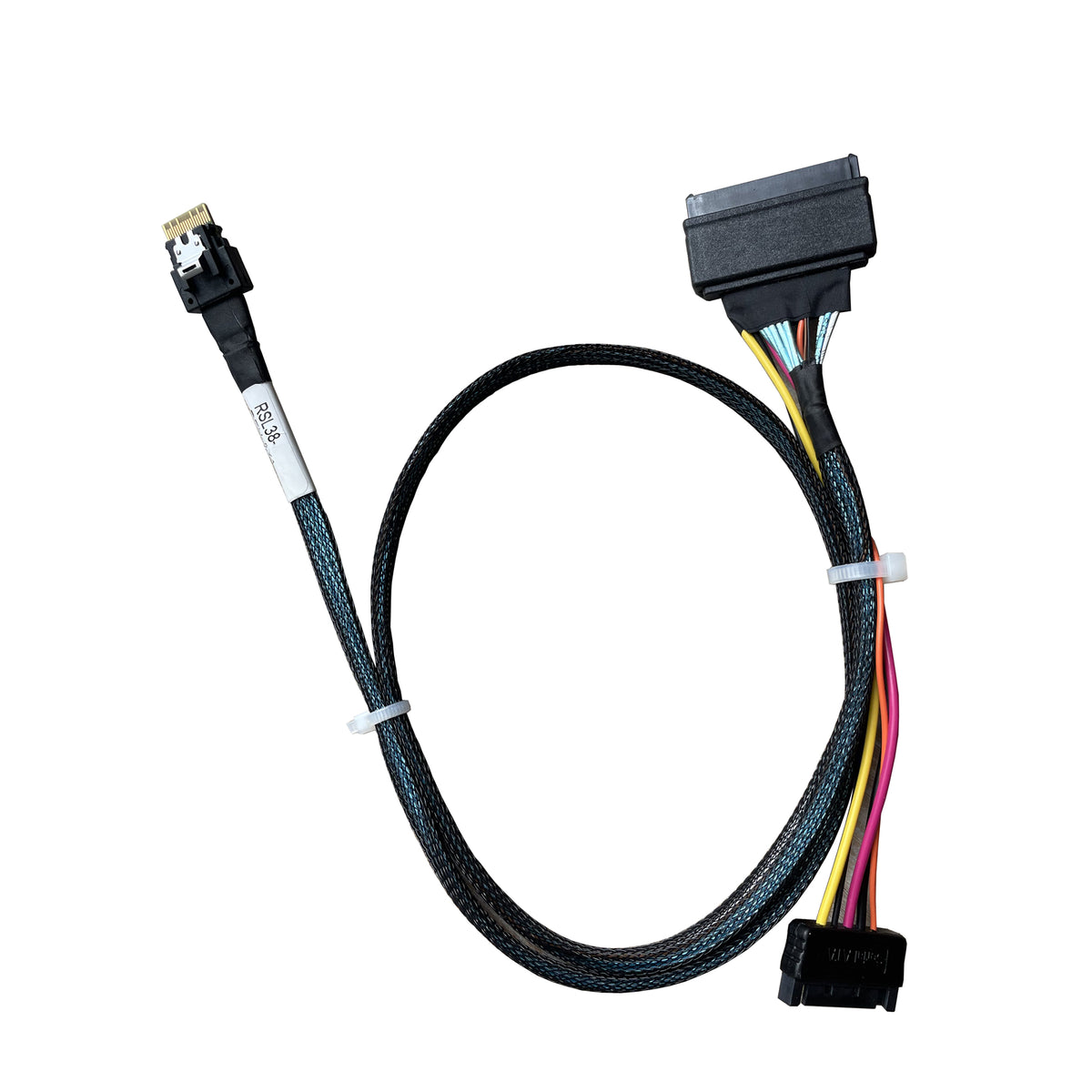
DiLinKer SlimSAS x4 (SFF-8654 38-Pin) to U.3 NVMe Cable, SFF-8639, with SATA Power, 75cm
DiLinKer SlimSAS x4 (SFF-8654 38-Pin) to U.3 NVMe Cable, SFF-8639, with SATA Power, 75cm
A four-lane PCIe cable from SlimSAS 4i (SFF-8654, 38-pin) to a U.3 drive on the 68-pin SFF-8639 shell, 75 cm, with a SATA power tail. Read the next paragraph before you buy: the connector looks like U.2 and is not wired like it.
U.3, not U.2 — and why that matters
- Same shell, different pin assignment. U.3 kept the 68-pin SFF-8639 connector so a single bay could take NVMe, SAS or SATA drives, but it reassigned pins to do it. This cable is wired for the U.3 arrangement. Put a U.2 drive on it and it will usually not enumerate at all — no error, just no device.
- Rated PCIe 4.0 x4. Four lanes at 16 GT/s each, roughly 7.9 GB/s of usable bandwidth, provided the host port and the drive are both Gen4. The 68-pin connector is not a speed limit — the drive and the host link decide the rate, not the shell.
- The SATA tail feeds the drive. A 2.5″ U.3 SSD has no other power input; it needs 12 V and 5 V from the PSU. The 15-pin tail is part of the cable, not an optional extra.
- 38-pin end where space is tight. SlimSAS shrank the 4i connector so more ports fit along a board edge. If your controller or riser exposes SFF-8654 rather than SFF-8643, this is the cable that reaches a U.3 bay.
Specifications
| Connector A | SlimSAS 4i, SFF-8654, 38-pin |
| Connector B | U.3, SFF-8639, 68-pin |
| Power | SATA 15-pin tail |
| Lanes | 4 (PCIe x4) |
| Length | 75 cm |
| Signal | PCIe 4.0 x4 rated (~7.9 GB/s) |
| Protocol | NVMe on U.3 drives — not U.2, not SAS/SATA |
| Part number | RSL38-3600-AX1 |
| SKU | B0CBP5BKJS |
Compatibility
Works with
- SlimSAS 4i host ports that carry PCIe lanes
- U.3 NVMe SSDs (the tri-mode pin arrangement)
- Gen4 hosts and drives, which is where this cable earns its price
Does not work with
- U.2 drives — this is the single most common mistake with this cable
- SAS or SATA drives on the 68-pin end
- 8-lane SlimSAS (74-pin) ports — those need an x8 fan-out cable
- U.3 backplane sockets — those need a cable with two plug ends
Typical deployments
- Gen4 U.3 drive on a SlimSAS controller. The controller exposes 38-pin ports; the drive is U.3; this is the one cable in the catalogue that joins them.
- Single-drive scratch or cache disk. One U.3 drive off one SlimSAS port, powered from the PSU, no backplane involved.
- Rack builds with mixed drive generations. Keep U.3 drives on their own cabling so a U.2 drive never gets plugged into the wrong one by mistake.
Frequently asked questions
Will a U.2 drive work on this cable?
No. That is the whole distinction. U.3 and U.2 share the physical 68-pin connector but not the pin assignment, so a U.2 drive normally does not enumerate. If your drive is U.2, take the U.2 version of this cable instead.
How do I tell whether my drive is U.2 or U.3?
Check the drive label or the vendor datasheet — U.3 parts are usually described as tri-mode. If you are unsure, send us the model number and we will tell you which cable to take. Getting this wrong is the number one return reason on this SKU.
Is it really PCIe 4.0?
The assembly is rated for Gen4 signalling. Actual speed is set by the host port and the drive: any Gen3 link in the chain pulls it back to Gen3.
Do I need the SATA power tail?
Yes. A 2.5″ U.3 SSD has no other power input.
Can I run SAS or SATA drives on it?
Not with this cable. The 68-pin end here is wired for NVMe on U.3.
My drive powers up but is not detected — what now?
First check the drive is U.3 rather than U.2. Second, confirm the SlimSAS port carries PCIe lanes and not SAS. Third, try another port. If it still does not appear, send us the drive model and the controller model and we will work it out with you.
In the box
- 1 × SlimSAS 4i (SFF-8654) to U.3 (SFF-8639) cable, 75 cm, with SATA power
Every cable is continuity- and pinout-tested before it ships and carries a 24-month warranty. If a link does not train, send us the controller model and the backplane part number before returning anything — in most cases the cable is the wrong variant for the port, not faulty, and we would rather tell you that up front.
Related
Product features
Product features
Materials and care
Materials and care
Merchandising tips
Merchandising tips
Share