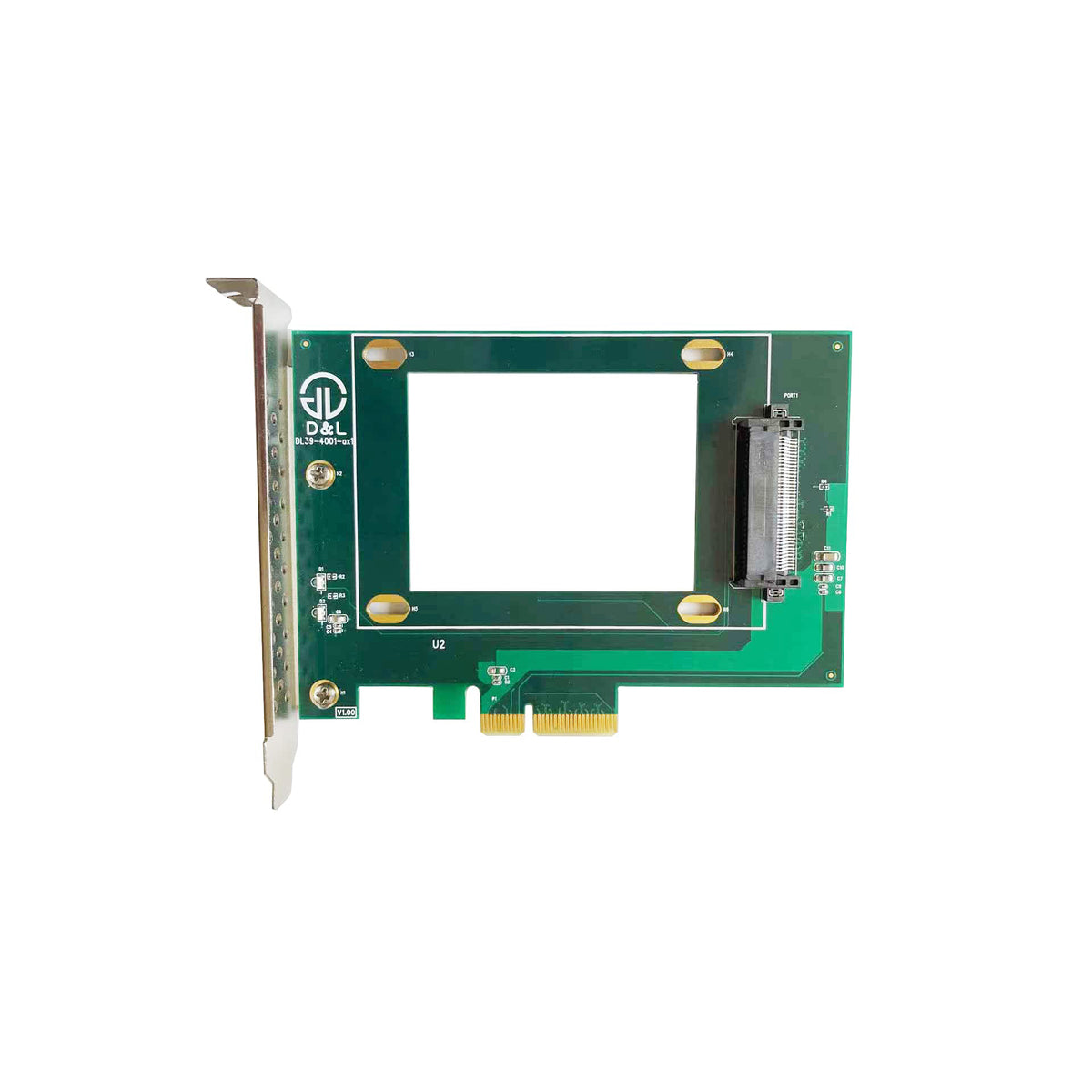
DiLinKer PCIe x4 to U.2 NVMe Adapter Card, SFF-8639 68-Pin, Drive Mounts on the Card, Full-Profile Bracket
DiLinKer PCIe x4 to U.2 NVMe Adapter Card, SFF-8639 68-Pin, Drive Mounts on the Card, Full-Profile Bracket
A PCIe x4 card with a U.2 (SFF-8639) connector built into it, so a 2.5″ NVMe SSD mounts straight onto the card and hangs off the slot — no cable, no drive bay, no power lead. It is the shortest possible path from a PCIe slot to a U.2 drive, and it is the right part when the chassis has a free slot but no usable 2.5″ mounting point.
When the card wins over a cable
- No cable, therefore no cable fault. The 68-pin connector is soldered to the card and the card sits in the slot. There is nothing to route, nothing to strain, and none of the intermittent-drive problems that come from a cable being pulled tight around a drive cage.
- Fits chassis that have no free 2.5″ bay. Small form-factor builds and rebuilt OEM machines often have the slot but not the mounting point. The drive travels with the card, so the chassis layout stops mattering.
- Slot-powered, no PSU lead. The card draws from the slot’s 12 V and 3.3 V rails and passes them to the drive through the 68-pin connector. No SATA or Molex tail to find a home for.
- Full-profile bracket, standard height. Ships with a full-height bracket fitted, so it goes into a normal ATX or rackmount chassis without modification. The card is a plain x4 device — no bifurcation, no switch chip, no driver.
Specifications
| Host interface | PCIe 3.0 x4 (backward compatible with PCIe 2.0 and 1.0) |
| Drive interface | U.2 / SFF-8639, 68-pin, onboard |
| Drive form factor | 2.5″ NVMe SSD, mounted on the card |
| Power | From the PCIe slot — no external power connector |
| Bracket | Full-profile, fitted |
| Cabling required | None |
| Warranty | 3 years |
| SKU | B07YKQ2C93 |
Compatibility
Works with
- Any x4, x8 or x16 PCIe slot on a desktop, workstation or server board
- 2.5″ U.2 NVMe SSDs — all vendors, including Intel DC P3500 / P3600 / P3700, Samsung XS1715, OCZ Z-Drive 6000, HGST Ultrastar SN100
- Chassis with clearance behind the card for a 2.5″ drive (roughly 7 mm plus the drive’s own thickness)
Does not work with
- SAS or SATA 2.5″ drives — the connector is PCIe-wired
- Drives that exceed the slot’s power budget; check the SSD datasheet for high-power enterprise models
- Low-profile-only chassis without swapping the bracket
- x1 slots — the drive needs four lanes
Typical deployments
- Small workstation with one free slot and no 2.5″ bay. Drive on the card, card in the slot, done in one step.
- Reusing a server U.2 drive in a desktop. No backplane, no RAID card, no cable — the cheapest way to get an enterprise SSD into a consumer board.
- Test bench with drives swapped constantly. The drive unplugs from the card in place, so you never touch the slot.
Frequently asked questions
Does the drive really just sit on the card?
Yes. The 2.5″ SSD plugs onto the onboard 68-pin connector and is supported by the card itself, so it is cantilevered off the slot. That is fine for a stationary machine; if the build gets moved around a lot, a cable-and-bay solution spreads the load better.
Will it fit next to my graphics card?
Measure first. The drive adds roughly 7 mm of thickness plus its own height behind the card, and a full-length GPU in the adjacent slot can leave less room than you expect. Most ATX builds are fine; dense rack chassis often are not.
Is it PCIe 4.0?
No — this card is PCIe 3.0 x4. A Gen4 drive will run at Gen3 speed on it, which is around 3.5 GB/s rather than 6–7. For Gen4 you want our PCIe 4.0 to U.2 cable instead.
Do I need any driver or firmware?
No. There is no switch chip and no bridge on the card; it is a passive electrical adapter, so the drive appears exactly as it would on a native U.2 port. NVMe support comes from the OS.
Why does the listing say PCIe 1.0 compatible?
Because the card is passive — it will run in an old slot at whatever that slot negotiates. In practice you would not put a U.2 NVMe drive behind a Gen1 link, but nothing breaks if you do.
Drive not detected — what should I check?
Whether the slot shares lanes with an M.2 socket or SATA ports (common on consumer boards), whether the drive is fully seated on the card, and whether the drive’s power draw fits the slot budget. If all three are fine, send us the board and SSD models.
In the box
- 1 × PCIe x4 to U.2 (SFF-8639) adapter card, full-profile bracket fitted (SKU B07YKQ2C93)
Every cable is continuity- and pinout-tested before it ships and carries a 24-month warranty. If a link does not train, send us the controller model and the backplane part number before returning anything — in most cases the cable is the wrong variant for the port, not faulty, and we would rather tell you that up front.
Related
Product features
Product features
Materials and care
Materials and care
Merchandising tips
Merchandising tips
Share